

VISUAL EFFECTS
Every creature, explosion, and impossible landscape you've seen on screen was built by a VFX artist.
This program teaches you how — from integrating CG elements with live-action footage to building full digital environments from scratch. You'll work with the same tools and pipelines used in professional productions,
developing both the technical skills and the artistic eye that studios look for.
CURRICULUM

MAYA
Autodesk Maya is the industry standard for 3D production —
the software behind character animation, visual effects, and environments in film, TV, and games worldwide.
At SFFS, Maya is the foundation of the pipeline.
From modeling and rigging to lighting and rendering,
you'll build the kind of fluency that studios expect from day one.

BASIC MODELING
<Maya를 처음 시작하는 사람을 위한 3D 기초 과정>
Maya의 기본 인터페이스와 3D 공간을 이해하고, 기본 모델링부터 하드 서페이스 모델링까지 단계적으로 학습합니다.
기초 → 모델링 → 오브젝트 완성

UV & Texture
<3D 모델에 색과 재질을 입혀 현실감을 더하는 과정>
UV 전개부터 V-Ray Material, Subdivision, 텍스처링까지 학습하며 3D 모델에 색상과 재질을 적용합니다.
모델링 → 재질 → 디테일 완성

Shading & Lighting
<모델을 실제처럼 표현하는 과정>
기본 쉐이딩과 라이팅부터 시작해 텍스처링을 심화하고, 다양한 재질의 특징을 표현하는 방법을 학습합니다. 3D 공간에 빛을 배치하고 조절하며 빛과 그림자의 원리를 이해하고, 피지컬 라이팅과 IES 조명을 활용해 자연스러운 조명을 표현합니다.
재질·빛·그림자를 직접 조절하여 하나의 완성된 장면을 만드는 단계입니다.

Camera & Render Pass
<3D 공간을 한 장의 완성된 화면으로 만드는 과정>
기본 카메라 사용법부터 원하는 구도와 시점을 만드는 방법을 배우며, 영상에서 카메라가 장면을 표현하는 방식을 이해합니다. Render Pass를 활용해 빛·그림자·반사 등의 요소를 분리하고, Compositing을 통해 각 요소를 합성하여 완성도 높은 이미지를 제작합니다.
3D 공간을 만드는 것에서 나아가, 카메라와 합성을 통해 보여지는 화면을 완성하는 단계입니다.
Rigging & Animation
<정지된 3D 모델에 움직임과 생명을 더하는 과정>
캐릭터와 오브젝트가 자연스럽게 움직일 수 있도록 뼈대와 컨트롤러를 구성하는 리깅을 학습합니다. 키 애니메이션을 시작으로 Constraint, Set Driven Key, Motion Path, Expression 등을 활용해 다양한 움직임을 제어하고, 모션캡쳐 데이터를 적용해 실제 움직임을 3D 캐릭터로 표현합니다.
3D 모델을 움직이는 콘텐츠로 발전시키고, 원하는 움직임을 설계하는 단계입니다.
Duration
6
Months
Class Capacity
8 ~ 12
Class Hours
2
H
Including Breaks
SUBSTANCE PAINTER
The difference between a 3D model that looks real
and one that doesn't usually comes down to texturing
— and Substance Painter is the industry's tool of choice for getting it right.
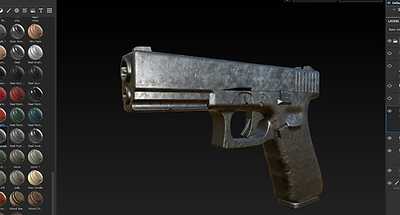
Working directly on the 3D surface, students apply materials,fine details,
and weathering effects using a layer-based workflow built around real-time PBR rendering.
At SFFS, Substance Painter is taught as part of the full asset pipeline,
seamlessly integrated with Maya and industry-standard renderers.

Basic & PBR Workflow
<Maya를 처음 시작하는 사람을 위한 3D 기초 과정>
Substance 3D Painter의 UI와 프로젝트 설정, 레이어, 매터리얼 등 기본 작업 환경을 익힙니다. PBR 워크플로우를 이해하고 색상·금속성·거칠기 등의 정보를 활용해 3D 모델에 다양한 재질을 표현합니다.
기본 환경 → PBR 이해 → 재질 표현

UV & Baking
<정확한 텍스처 작업을 위한 UV와 베이킹 과정>
UV Layout과 Mapping의 원리를 이해하고 3D 모델의 표면을 정확하게 펼치고 정리하는 방법을 학습합니다. Normal과 AO 맵을 베이킹하며 모델의 형태와 디테일 정보를 텍스처 작업에 활용합니다.
UV → Baking → 텍스처 작업 준비
Smart Materials & Texturing
<재질과 표면 디테일을 사실적으로 표현하는 과정>
Smart Materials와 Masks, Layers를 활용해 다양한 재질을 효율적으로 표현하고 세밀하게 수정하는 방법을 학습합니다. 스크래치·오염·마모 등의 디테일과 Roughness, Metallic 값을 조절해 사실적인 표면을 완성합니다.
재질 → 디테일 → 사실적인 텍스처

Export & Pipeline Integration
<완성된 텍스처를 실제 CG 파이프라인에 연결하는 과정>
텍스처 맵을 필요한 형태로 Export하고 Maya, 렌더러, 게임 엔진에 적용하는 방법을 학습합니다. 프로젝트 실습을 통해 텍스처를 적용하고 렌더링 결과를 확인하며 최종 결과물까지 완성합니다.
Export → 적용 → 최종 결과물
Duration
2
Months
Class Capacity
8 ~ 12
Class Hours
2
H
Including Breaks

NUKE (+AI)
Nuke is the compositing tool of choice at the world's top VFX studios
— the software that takes every rendered element and turns them into a finished shot.
At SFFS, students learn Nuke as the final stage of the production pipeline,
developing the eye and the technical precision to make CG and live-action footage
feel like they were always in the same world.
Nuke Basic & Compositing
<Nuke 기초와 이미지 합성 과정>
Nuke의 기본 인터페이스와 노드 구조를 익히고, Alpha·Roto·Mask를 활용한 기초 합성을 학습합니다. 블렌드 모드와 기본 노드를 활용해 이미지와 영상을 자연스럽게 합성하고 결과물을 출력합니다.
Nuke 기초 → 노드 합성 → 결과물 완성
Tracking & Keying
<촬영 영상과 CG를 자연스럽게 연결하는 과정>
Tracking과 Stabilize를 통해 영상의 움직임을 분석하고, Keying과 Remove를 활용해 필요한 요소를 분리합니다. V-Ray Multi-pass를 활용해 CG의 색상·반사·그림자 등을 조절하고 실사 영상과 자연스럽게 합성합니다.
Tracking → Keying → CG 합성
Nuke 3D & Advanced Compositing
<3D 공간과 카메라를 활용한 고급 합성 과정>
Nuke의 3D 공간과 Projection, 3D Camera Tracking을 활용해 실제 촬영 공간을 재현하고 CG를 자연스럽게 배치합니다. Rotoscoping과 Focus Match 등 다양한 기법을 활용해 정교한 VFX 합성을 완성합니다.
3D 공간 → Camera Tracking → VFX 합성
Duration
3
Months
Class Capacity
8 ~ 12
Class Hours
2
H
Including Breaks

HOUDINI
Every explosion, flood, and collapsing building you've seen on screen was most likely built in Houdini.
The industry's most powerful tool for simulation and FX,
oudini handles everything from pyro and fluids to destruction and character effects
— the kind of work that makes audiences forget they're watching something that was never real.
At SFFS, students learn Houdini as a core part of the FX pipeline,
building the technical depth to create effects that hold up on the biggest screens in the world.

Houdini Basic & Procedural Workflow
<Houdini 기초와 프로시저럴 방식 익히기>
Houdini의 기본 인터페이스와 작업 환경을 익히고, 프로시저럴 워크플로우의 기본 개념을 학습합니다.
노드와 데이터의 흐름을 이해하며 체계적인 3D 작업 구조를 익힙니다.
Houdini 기초 → Procedural Workflow → 작업 구조 이해

Houdini Core & FX Basics
<3D 데이터와 기본 FX 이해>
Houdini의 데이터 구조와 주요 기능을 이해하고, Copy, For Each 등을 활용한 오브젝트 제어 방법을 학습합니다.
카메라, 조명, 렌더링과 POP를 활용한 입자 FX의 기본기를 익힙니다.
디테일 → Retopology → UV

Shader & Particle FX
<물, 먼지, 안개 등 자연현상을 3D로 표현하는 과정>
Shader와 Particle을 활용해 물, 먼지, 안개 등 다양한 자연현상을 표현하는 방법을 학습합니다.
Displacement, POP, Ocean Toolkit 등을 활용해 재질과 자연현상을 3D로 구현합니다.
Shader → Particle FX → Natural Effects

VEX & Volume FX
<VEX와 복잡한 FX 제작>
Houdini의 프로그래밍 언어인 VEX를 활용해 데이터를 직접 제어하고 다양한 작업에 적용하는 방법을 학습합니다.
Volume과 Fluid Solver를 활용해 연기, 안개 등의 복잡한 FX를 제작합니다.
VEX Programming → Volume FX → Fluid Simulation

Destruction FX
<파괴 FX 제작>
Fault Modeling을 시작으로 오브젝트가 부서지고 무너지는 Destruction FX의 기본 원리를 학습합니다.
Advanced 및 Dynamic Destruction을 통해 파편, 충돌, 붕괴 등 사실적인 파괴 효과를 제작합니다.
Fault Modeling → Advanced Destruction → Dynamic Destruction

Asset & Tool Development
<Asset & Tool 제작>
Asset과 OTL을 활용해 반복적인 작업을 효율적으로 처리할 수 있는 나만의 Houdini 툴을 제작합니다.
SOP Solver와 다양한 FX 기술을 연결해 재사용 가능한 작업 시스템을 구축하는 방법을 학습합니다.
Houdini Asset → SOP Solver → Tool Development
Duration
6
Months
Class Capacity
8 ~ 12
Class Hours
2
H
Including Breaks
ZBRUSH

ZBrush is where characters come to life —
the industry's go-to tool for high-detail sculpting,
from creature design and anatomy to props and surface texturing.
At SFFS, ZBrush is taught as part of a complete character pipeline,
giving students the technical control and creative freedom to build work that holds up at production level.
ZBrush Basic & Head Sculpting
<ZBrush 기초와 얼굴 스컬프팅 과정>
ZBrush의 기본 기능과 DynaMesh, Sub Tool, Mask, Polygroup 등을 익히고 다양한 브러시를 활용해 형태를 조각합니다. 인체 해부학을 이해하며 눈·코·입 등 얼굴의 구조를 직접 스컬프팅합니다.
ZBrush 기초 → 해부학 → Head Sculpting
Detail & Retopology
<디테일을 더하고 제작 가능한 모델로 정리하는 과정>
알파 브러시와 디스플레이스먼트를 활용해 피부·주름·표면의 디테일을 표현하고, Boolean을 이용한 형태 제작을 학습합니다. Retopology와 UV를 통해 복잡한 스컬프 모델을 실제 제작에 활용할 수 있는 구조로 정리합니다.
디테일 → Retopology → UV
Costume & Prop
<캐릭터의 의상과 소품을 제작하는 과정>
ZBrush Dynamic과 ZModeler를 활용해 의상과 소품을 제작하고, IMM Brush와 MicroMesh를 활용해 장식과 표면 디테일을 추가합니다.
의상 → 장신구 → Prop 완성
Creature Sculpting
<상상 속 생명체를 디자인하고 스컬프팅하는 과정>
인체·동물 해부학을 바탕으로 크리쳐의 형태와 구조를 설계하고, 근육·피부·질감 등의 디테일을 표현합니다. 완성된 크리쳐를 Retopology까지 진행해 실제 제작 가능한 모델로 완성합니다.
디자인 → 해부학 → Creature Sculpting
Texture & Rendering
<캐릭터에 질감과 재질을 더해 완성하는 과정>
Substance 3D Painter를 활용해 캐릭터의 색상과 재질, 피부 질감을 표현하고 스캔 데이터를 활용해 사실적인 디테일을 더합니다. Normal·Displacement Map을 적용하고 Maya에서 최종 렌더링까지 진행합니다.
Texture → Material → Final Render