


SUBJECT PROGRAMS
CAMPUS / ONLINE
SFFS Subject Programs are designed for students who want to go deeper into a specific area of CG, VFX, 3D animation, games, or commercial video production.
Each course provides intensive, focused training in a core discipline — modeling, rendering and lighting, animation, compositing, or FX — led by instructors with hands-on industry experience.
These programs allow students to build on their existing foundation, sharpen their portfolio in their chosen field, and prepare for a specialized career in the global VFX industry.
Students are grouped by level — those at different stages of progress are taught separately.

MAYA
Autodesk Maya is the industry standard for 3D production —
the software behind character animation, visual effects, and environments in film, TV, and games worldwide.
At SFFS, Maya is the foundation of the pipeline.
From modeling and rigging to lighting and rendering,
you'll build the kind of fluency that studios expect from day one.
Duration
6
Months
Class Capacity
8 ~ 12
Class Hours
2
H
Including Breaks

BASIC MODELING
<Maya Basics for First-Time Learners>
Learn Maya’s interface and 3D space, progressing step by step from basic modeling to hard-surface modeling.
Basics → Modeling → Final Object

UV & Texture
<Adding Color and Materials to Bring 3D Models to Life>
Learn UV mapping, V-Ray materials, subdivision, and texturing to add realistic colors and materials to 3D models.
Modeling → Materials → Final Details

Shading & Lighting
<Creating Realistic 3D Scenes>
Learn basic shading and lighting, advanced texturing, and how to recreate the characteristics of different materials. Explore light and shadow by placing and adjusting lights in 3D space, then use physical and IES lighting to create natural illumination.
Build a complete scene by controlling materials, light, and shadow.
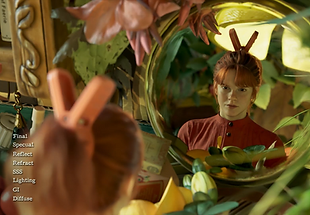
Camera & Render Pass
<Turning a 3D Space into a Finished Image>
Learn basic camera techniques to create the desired composition and perspective, and understand how cameras frame a scene. Use Render Passes to separate light, shadow, and reflections, then combine them through compositing to create a polished final image.
Go beyond building a 3D space and complete the final image through camera work and compositing.
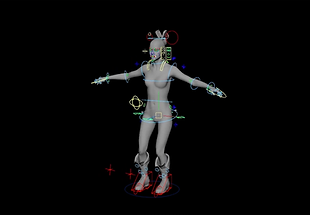
Rigging & Animation
<Bringing Movement and Life to 3D Models>
Learn rigging by building skeletons and controllers for natural character and object movement. Start with keyframe animation, then use Constraints, Set Driven Keys, Motion Paths, and Expressions to control various movements and apply motion capture data to create realistic character animation.
Turn static 3D models into animated content and design the movements you want.